



A MAM (Multi-Account Manager) account allows a master trader to manage multiple investor accounts from one central platform.
o
n
e
x
a
r

-

Regulation:
-

-
support@onexar.com

MAM Account
Overview

OneXar MAM Account– Multi-Account Manager
How to Get Started
- Sign up with your Onexar account and choose MAM Account.
- Choose to become a Signal Provider (Master) or Follower (Investor).
- Once approved (within 24 business hours), you can start using the MAM dashboard.
MAM Platform Overview
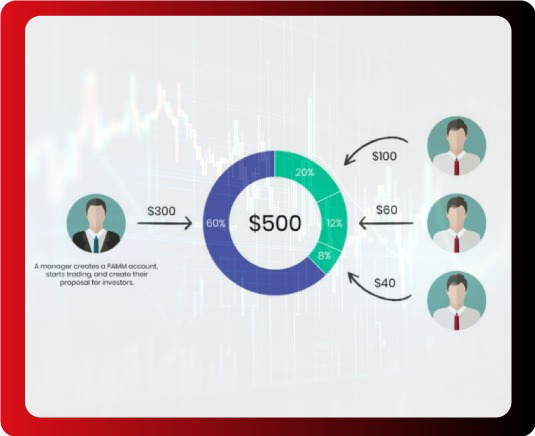
Overview
What is MAM?
MAM (Multi-Account Manager) allows professional traders to manage multiple client accounts from a single interface. All trades from the master account are copied into follower accounts, either proportionally or based on custom risk settings.
How does it work?
- Masters execute trades in their main account.
- Followers’ accounts copy the trades instantly.
- Options like Reverse Trades, Risk Limits, and Custom Allocation give flexibility and control.
Trade Execution Example:
MAM Master Account: $10,000, Volume: 0.10, Buy EUR/USD
- Investor 1: $5,000, Risk Ratio: 2, Order: No Reverse – Volume 0.10 – Buy,
- Investor 2: $20,000, Risk Ratio: 2, Order: Reverse – Volume 0.40 – Sell (Reversed)
- Investor 3: $12,000, Risk Ratio: 1 Order: No Reverse – Volume 0.12 – Buy
For Signal Providers (Masters)
Execute trades across multiple accounts seamlessly.
Set up advanced features like:
- Reverse Copy: Sends opposite trades to followers.
- Pause Copy: Temporarily stop trade syncing.
- Risk Ratio: Control trade volume exposure per follower.
For Investors (Followers)
- Follow experienced money managers using proven strategies.
- Ideal for those who lack the time or expertise to trade themselves.
- Set your own risk tolerance and manage subscriptions easily.
- View live trades and monitor performance directly from your dashboard.
Top Traders Leaderboard
Faq’s
-
1What is a MAM Account?
-
2How does MAM work?
Masters execute trades in their main account, and followers automatically copy the same trades based on their allocation settings.
-
3How is MAM different from PAMM?
MAM allows individual trade allocation, risk ratios, and reverse trades, while PAMM is pooled and uses proportional distribution.
-
4Do followers need separate accounts?
Yes. Followers open a dedicated MAM investor MT5 account to be linked with the master.
-
5Can masters reverse or pause trades?
Yes. Masters can reverse trades for specific followers or temporarily stop copy flow.
-
6Can followers set custom risk ratios?
Yes. Investors can set 0.5x, 1x, 2x, or any custom ratio based on their risk appetite.
-
7How to become a MAM Master?
Sign up for a MAM account, submit required details, and get approved within 24 business hours.
-
8Can followers see live trades?
Yes. All trades opened by the master are visible inside MT5 and the investor dashboard.
-
9Can followers place manual trades?
No. Manual trades in a MAM-linked account may be restricted to avoid allocation conflicts.
-
10How do investors unsubscribe?
Investors can disconnect anytime, ideally when no trades are open.